VPN vs. Proxy: What Changes for Your Apps and Your Privacy?
A VPN and a proxy can both relay some of your traffic through another server. To understand the difference, ask three questions: which apps use that path, where is the connection encrypted, and who can see information about it? Seeing a new public IP address in one browser tab only tells you what happened to that request.
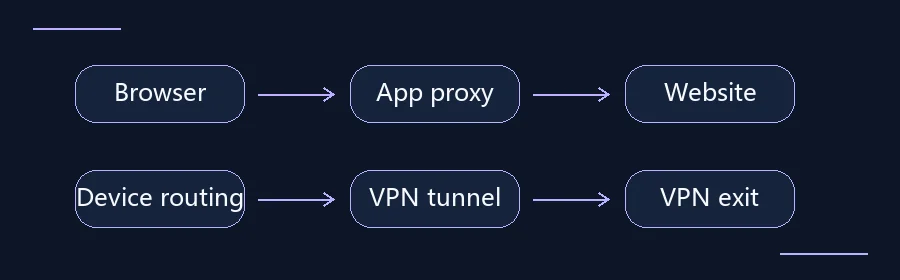
Browser proxy vs system proxy vs VPN
A browser proxy generally handles that browser’s requests. A system proxy affects apps that honor system settings. A VPN covers traffic according to its routing and split-tunneling configuration. Proxy encryption depends on the protocol. A VPN normally encrypts tunnel traffic between your device and the VPN server. Check app support if you only need a proxy for one app, or check VPN routing if several apps need the same exit.
Related guide: What Is a VPN? Follow One Web Request From Your Device
Find the point where traffic enters the relay
An HTTP proxy handles requests that an app sends according to its proxy settings. A browser extension that provides a proxy may cover only that browser or only certain sites. Some operating systems let you specify a proxy centrally, but an app can use its own settings or ignore the system proxy. A desktop meeting client or software updater may still connect the usual way.
A device VPN generally uses an operating system interface and routing rules to send selected traffic to a VPN server. A full tunnel usually covers more of the device’s traffic. A split tunnel may intentionally keep some apps, destinations, or local network services outside the tunnel. An employer’s remote access VPN may handle traffic to company resources only. Check the actual policy before deciding what it covers.
Separate local link protection from HTTPS
The VPN tunnel typically protects the part of the path between your device and the VPN server. When you visit an HTTPS site, the browser also negotiates TLS with the website. The VPN layer ends at the VPN exit, while the HTTPS connection continues to the site. If a destination only uses plain HTTP, enabling a VPN does not encrypt that HTTP traffic beyond the VPN exit.
Proxy behavior depends on the protocol and how the proxy is deployed. An HTTP client can ask a proxy to create a tunnel using CONNECT, then negotiate TLS with the destination through it. The outer connection to the proxy may or may not be encrypted, and the proxy can still have information about the destination or connection. A product label alone does not tell you which segment is protected.
Choose according to the job
If you only need a managed browser to use your employer’s web proxy, follow the configuration your IT team provides. If you want both a browser and a desktop app to use a controlled connection, check a device VPN and its split tunneling rules. If the job is reaching a private company service, follow the organization’s own access and authentication process. A consumer VPN or a web proxy does not grant permission to enter an internal network.
On public Wi-Fi, verify the network and site address and keep HTTPS certificate validation in place, whichever tool you use. A VPN or proxy operator may have access to connection metadata. A site still knows about the account you use to sign in. Do not enter passwords into a web proxy you cannot verify, and do not bypass a certificate warning to make a connection work.
| Question | Application proxy | Device VPN |
|---|---|---|
| Where does traffic enter? | App or extension settings | System interface and routing policy |
| What is covered? | Requests sent to the proxy | Traffic selected by VPN routing rules |
| What about HTTPS? | TLS behavior depends on the proxy setup | HTTPS still matters beyond the VPN exit |
Run a small coverage test on a trusted network
Choose two browsers, or one browser and a separate app whose connection you can observe independently. With the tool disconnected, record what public exit each app uses. Avoid signing in or sending sensitive information. Enable only one tool and repeat the same tests on the same device and network. Use a test destination that makes sense for the route you expect: a browser IP check reports on a browser request, not every process on the device.
If the public IP changes only in the browser that runs the extension, that is consistent with a browser scoped proxy. If it changes in both apps, you have evidence about those requests. You still cannot conclude that all apps, DNS requests, or IPv6 traffic follow the same path. On a managed device, check what tests your IT team allows before you begin.
Interpret a surprising result in context
An unchanged public IP does not necessarily mean the tool did nothing. The test destination may be excluded by a split tunnel rule, or the VPN and ordinary route may share an expected exit in your environment. A changed address, in turn, does not establish anonymity or prove that every connection is encrypted. Write down the app, the destination, and the path you expected, then compare the result with that specific expectation.
For example, if a work dashboard opens only after you connect to your organization’s VPN while a public IP checker gives the same result both times, the company VPN may be working as configured. Check the expected route with IT instead of changing unrelated network settings.