How to Use a VPN Free Trial Without Surprise Charges
A VPN free trial should help you answer two questions: can the service handle the task you need it for, and what happens if you decide to stop? Keep the trial eligibility, end date, and cancellation instructions together. That way, you know where to look even if you found the offer on the provider’s site but the subscription is managed through an app store.
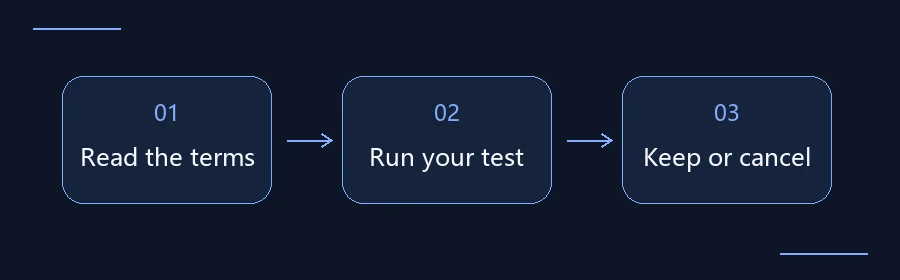
How to request a VPN free trial and what to test
- Confirm the trial terms first. Check supported devices, the end date, and whether you need a payment method or must cancel manually. To ask about a Plain VPN trial, contact Plain VPN support with your device model and what you need to do. Support can confirm eligibility and duration.
- Test what you expect to do every day. Compare Wi-Fi and cellular on the same device. Open your usual apps or sites, check whether the connection stays up, and use the same speed test before and after connecting.
- Decide before the trial ends. If you started a subscription, check its renewal date and cancellation options in the channel where you signed up. For more on plan length and terms, see how to choose a VPN plan.
Identify the type of offer
A trial with no payment method may simply end when the time runs out. A trial that asks for billing details may convert automatically or ask you to confirm a plan before charging you. With a money-back guarantee, you usually pay up front and have to request a refund under the stated terms. Canceling future renewals and getting back money already paid are separate actions. Check which arrangement you are accepting before you place an order.
Follow the official offer to its subscription screen. Check what starts the clock: installation, registration, or activation. Find out who qualifies and which devices, features, or locations are included. Record the amount of the first charge and the renewal schedule. If a page says “seven days” without a deadline, look in subscription management for the exact date, time zone, and latest time you can cancel.
Use the billing channel to find the cancellation controls
For a direct subscription, look in the provider’s account or billing settings. For a subscription billed by an app store, look in that store’s subscription history. Use the confirmation email or receipt to tell who bills you; the place you downloaded the app may be different. Uninstalling the app, signing out, or deleting a shortcut does not normally cancel billing.
Suppose an order confirmation says the paid subscription begins Friday at 6 p.m., and that you must cancel at least 24 hours earlier. Your deadline would be Thursday at 6 p.m. in the time zone listed on the order. Set a reminder for Wednesday so you have time to deal with an error or ask for help. This is an example of how to calculate a deadline, not the terms of any particular service.
| When | What to record |
|---|---|
| Before signing up | Charges, trial start, eligibility, supported devices |
| During the trial | Essential task, network changes, recovery behavior |
| Before the deadline | Billing time and zone, cancellation channel, proof of cancellation |
Use the trial to test the work you care about
Pick a device you rely on, a familiar network, and a task that does not use sensitive data. Install from an official source and confirm that the operating system allows the app to create the connection. Then try opening the sites you use or make a brief test call. If you switch between Wi-Fi and mobile data during your commute, try that on familiar networks. Observe whether the connection recovers automatically, requires a tap, or lets some traffic use the regular network during the switch.
Write down the operating system, app version, network type, time, and visible symptom if anything goes wrong. The objective is to find out whether your main task works. You do not need to try every server. If you intend to use the subscription on more than one device, use your second device to verify compatibility and any simultaneous connection requirement.
If you cancel, check that the subscription reflects it
Use the stated cancellation channel and keep the confirmation email or a screenshot of the subscription status. Look for a clear indication that it will not renew, the date access ends, and whether any future charge is still listed. If you share a screenshot for help, hide account details, order information, and payment data that the recipient does not need.
If a charge has already appeared, compare the merchant, time, and amount with your receipt. Then check the relevant cancellation and refund policies separately. Avoid filing duplicate requests before you know who handled the payment. Never include passwords, complete card numbers, or verification codes in a support message.
Make one final check before keeping the plan
Start with your test results, then confirm exactly what the plan after the trial includes. A trial can expose features that do not carry over into the subscription you selected. Review the first and recurring charges, the device allowance, and the billing channel. If you can describe the amount and the limits you are accepting in one sentence, you are in a better position to decide. If you cannot, pause and check the offer before it renews.
If you only need temporary access, note the point when you expect to stop using it. Compare that date with the plan’s billing cycle so you can decide whether to keep the trial, buy a shorter plan, or cancel before a new charge.